On your phone

A homeschool planning app
for your pocket.

Today’s work for every child, checked off with a thumb, with a baby on your other hip.

Working on your phone right nowOpen marginplanner.com in your phone’s browser and sign in. Today’s lessons are there, and so is everything below. Add it to your home screen and it opens like any other app.
The app is out on both storesMargin is on the App Store and on Google Play. Download it, sign in with the email you already use, and the year you have planned is already in it. Get the app.
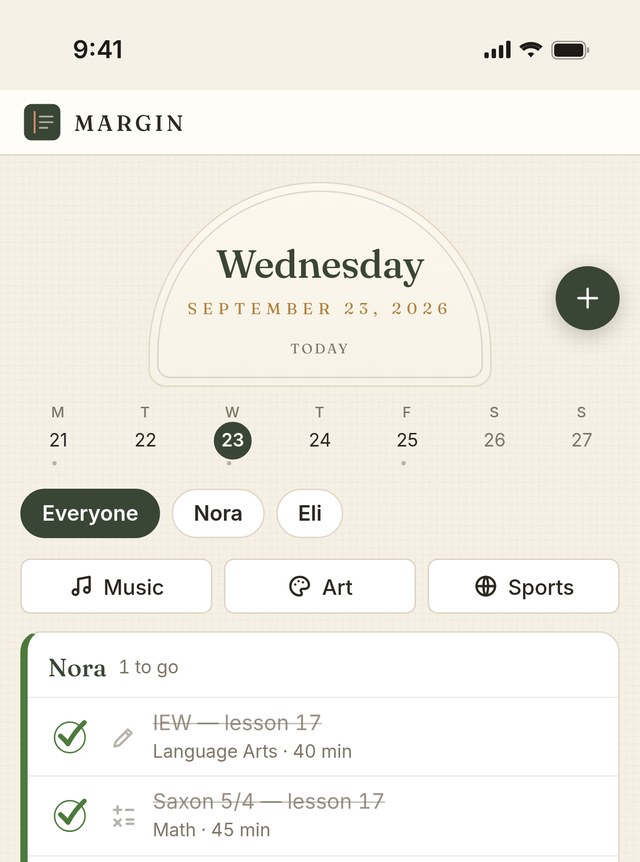
Margin on a phone, showing today's lessons for each child
Today

The homeschool planning app opens on today.

Not a month grid you have to hunt through. The day you are standing in, with each child’s lessons in the order you’ll actually do them.

  • Every child’s work on one screen, or one child at a time
  • Tap a lesson to check it off. That is the whole thing
  • Press and hold a lesson to move it to another day
  • Read-alouds, chores and practice minutes sit there too, if you turned them on
Start your free trial

Built for a hand, not a mouse.

Most of homeschooling happens standing up. These are the parts that assume that.

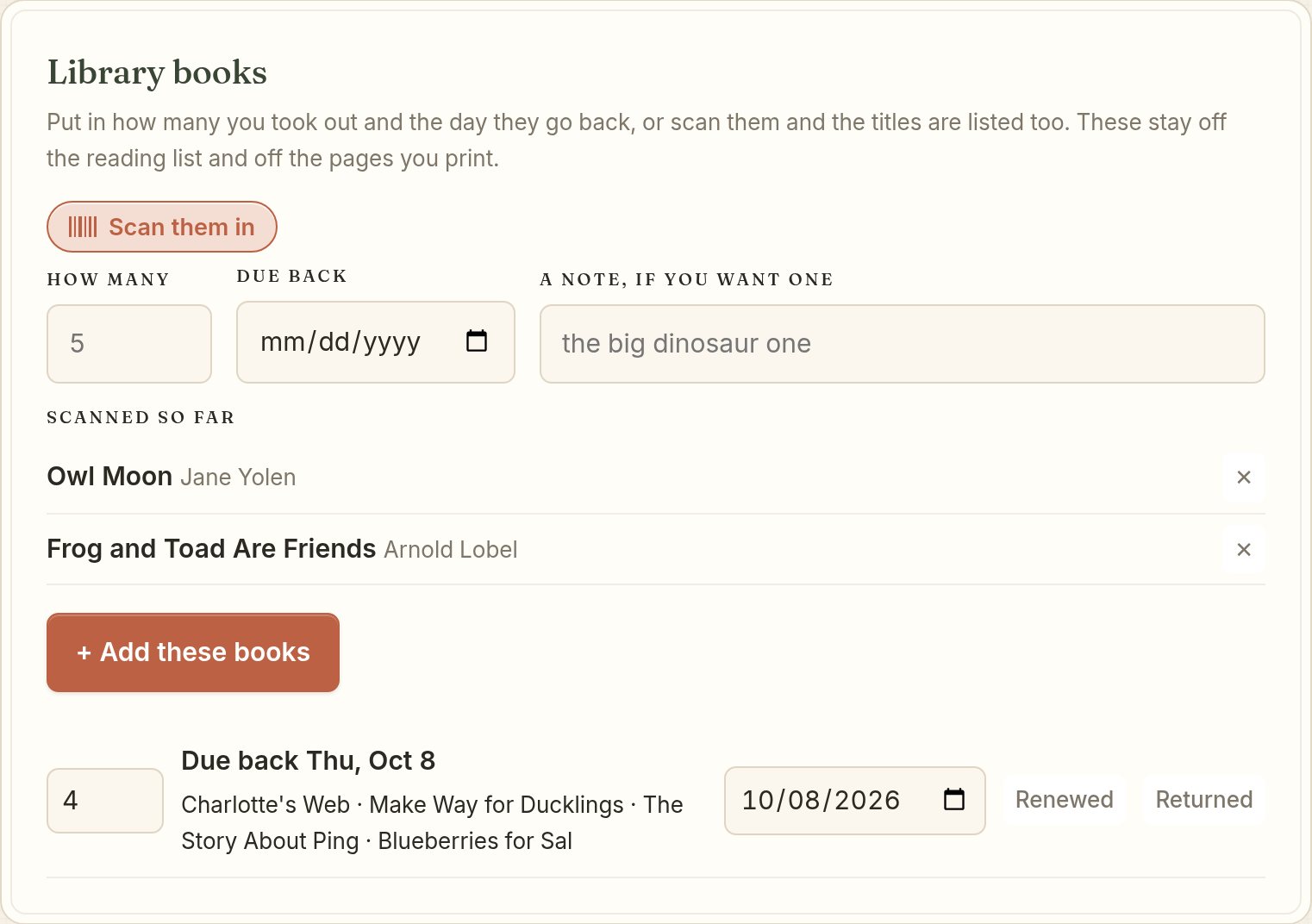
Scan the library stackPoint the camera at the barcode on the back of a book and the title and author fill themselves in. Came home with a pile? Scan the whole pile.
Due dates on the calendarA library book goes on your calendar on the day it is due back, so the stack leaves the house before the late fee.
It buzzes when you check offA small buzz on the phone as each lesson goes. Turn it off in settings if you would rather it stayed quiet.
Drag math to ThursdayMath did not happen? Press and hold, drag it to Thursday, and the rest of the year settles around it.
A morning note, if you want oneIn the app, one note at a time you pick, on the days you teach. Off unless you turn it on.
Today’s count on the lock screenOn an iPhone, the app can show how today is going without you unlocking anything. Swipe it away and it stays away till tomorrow.
The same year

Plan on the laptop. Teach from your phone.

The phone is not a cut-down copy. It is the same year you laid out in August, held the way you hold a phone.

  • Check math off on the phone and it is checked off on the laptop
  • Works offline once it has loaded, so a bad signal at the park is fine
  • A second parent can have their own login and check work off too

The browser side is written up on the online homeschool planner page. If you are still deciding between this and a paper planner, I laid that out on the digital homeschool planner page.

Library books scanned into Margin, listed by title with a due date
Scanned in on the kitchen counter

Your children’s schedule is not a product. A promise, not a setting.

It is never sold, never shared, and never handed to an AI to learn from. Not from the phone and not from anywhere else.

Thursday, 4 p.m.

Fixing the week from the carpool line.

You are in the pickup line with fifteen minutes and one hand free, and half the week did not happen.

You tell Margin what you missed. It gives you three ways to fit the work back in, and each one says how long your longest day gets. You tap the one you can live with, and it is done before the kids are in the car.

Get it done soonest

Caught up by next week

The work goes into the next few days that have room for it. Those days run longer and the gap closes quickly.

Spread it out

A few weeks

Each subject goes onto its own lightest day. Nothing lands on a day that was already full.

Barely notice it

You hardly feel it

The same thing spread much further out. It tells you the cost in minutes before you agree to it.

Sometimes none of the three fit. Margin says so instead of quietly going over the hours you set. Then it offers to lay the rest of the year out again from today, or to add days at the end and tell you how many.

You are not behind. The plan changed.

Checking off

You check it off, and it is written down.

Nobody sits down at a desk at four o’clock and writes up the day. You check things off while they happen, and the record comes out of that.

A day counts as school if it has bookwork on it, or a co-op, an activity or a field trip, and it is not a day off. Your co-op Tuesday counts even though you laid no math on it. A field trip is checked off as a whole day, because standing on a beach watching a storm come in is not something you count in minutes.

What a tap actually does

  • Tap a lesson to check it off, and that child’s day moves with it
  • Press and hold a lesson to move it to another day
  • Attendance is counted per child, because your seven-year-old and your four-year-old do not have the same day
  • Nothing has to be written up afterward

With no signal at all

  • Once the page has loaded it keeps working with no signal
  • Your taps are saved on the phone first and catch up later
  • Check something off on the phone and it is there on the laptop
  • An older copy can never overwrite a newer one
The honest part

What it will not do.

You would find all of this out in week two. Here it is now, before you pay us anything.

  • No college transcript. If you keep grades there is a report card, and it is not a transcript. There is no grade point average, no credits and no state scale.
  • No lesson content. Margin plans and records the curriculum you already own. It does not teach, and it sells you nothing to teach with.
  • No AI anywhere near your children. Your children’s schedule is not a product. It is never sold, never shared, and never handed to an AI to learn from.
  • No ads and no trackers. Nothing in Margin is selling your family’s attention to anybody.
  • No promised app date. Apple decides when the app appears. We are not going to make up a date for you.
  • No free tier. There are fourteen days free with everything in them, and the trial asks for a card.

Questions about using it on a phone.

Can I use it on my phone today?

Yes. Open marginplanner.com on your phone and sign in, and today’s lessons for every child are there. Add it to your home screen and it opens like anything else on your phone.

Where do I get the app?

Margin is on the App Store and on Google Play. Download it on the phone you already carry and sign in with the same email you use on the website. Everything you have planned is already in it, and anything you change on your phone shows up on your laptop.

Does it work without a signal?

Yes, once the page has loaded. Your plan is saved on the phone first. The church basement your co-op meets in and the campground with no bars both work, and your taps catch up when you are back online.

Will my phone and my laptop stay in step?

Yes. You plan on the couch after the children are down and check math off on your phone in the morning. It is the same year either way, and an older copy can never overwrite a newer one.

How do I move a lesson to another day?

Press and hold the lesson and move it. If a whole week went wrong, tell Margin what you missed instead and it gives you three ways to fit it all back in.

Can I read my records on a phone?

Yes. The record is laid out for paper, so on a phone each subject becomes its own block instead of five columns squeezed together. You can print it or save it as a PDF from there.

Can my husband use it on his phone too?

Yes. You add a second parent with their own login and you choose what they can do, whether that is only looking, changing the calendar, or everything.

Do I have to plan on the phone as well?

No, and most mothers do not. Setting the year up is easier on a bigger screen with your books out on the table. The phone is for the day itself.

What does it cost?

It is $8 a month for your whole family, however many children you have, or $80 a year, which gives you two months free. The first fourteen days are free with everything in them, and the trial asks for a card.

Is my children’s information safe?

Your children’s schedule is not a product. It is never sold, never shared, and never handed to an AI to learn from. There are no ads and no trackers. You can read the whole of what we believe on the values page.

Start your free trial

More answers are on the questions page.

What it costs.

$8
a month for your whole family, however many children you have. Or $80 a year, which gives you two months free.
14-day free trial with everything included. And if you ever stop paying, you keep your records. You can still open, print and export every year you planned in Margin.
Start your free trial

Start today, on the phone in your hand.

Sign up now and use it this morning, in the app or in your browser. It is the same planner either way.

Questions · What we believe · Notes · Help · Contact · Privacy · Terms · Affiliate

Online homeschool planner · Digital homeschool planner · Homeschool planning app

Margin™ © 2026 Margin Planner LLC