Feature overview

Everything Margin does
in one place.

Plans change. Sometimes by Tuesday. Margin is a planner that changes right along with you.

Plan your whole year.
Stay relaxed when the plan changes.
Print your records anytime.
A craft table: markers, watercolors and painted stones

Most planners get you through September. What’s getting you through February?

By then somebody has had strep and the co-op moved a week. One child is eleven lessons ahead in math and four behind in spelling. The year you laid out so carefully in August was planned for a family that doesn’t exist anymore.

And if you’re anything like me…

  • You re-plan every subject by hand and hope it all still fits before May.
  • Your plan is in one place, attendance is in another, and the reading list is in a notebook somewhere.
  • A day at the aquarium was school, plain and simple. But there was no box for it, so it never got counted.
Start your free trial
Laying out the year

Each child gets a plan for every single day.

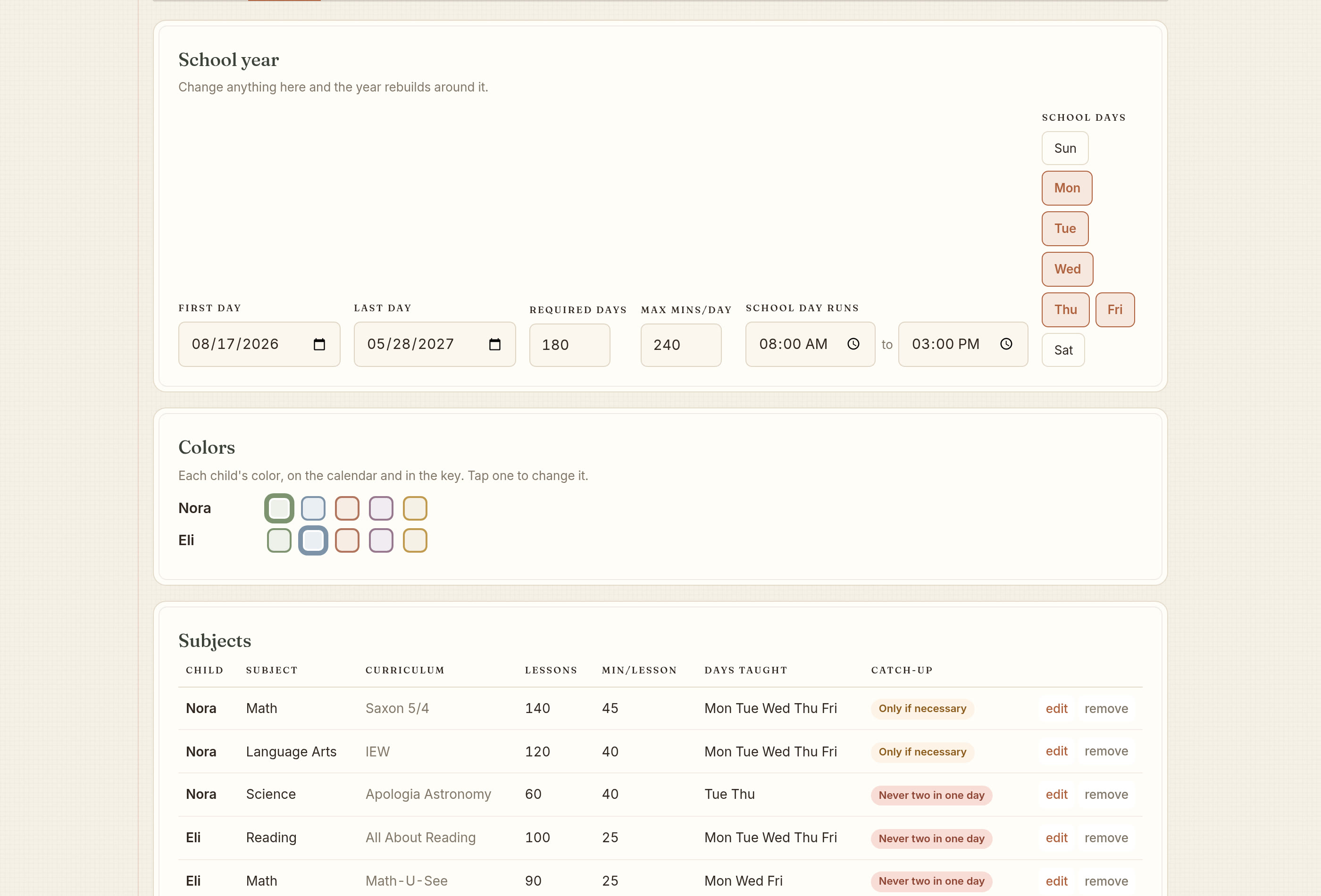
Tell Margin what each child is studying and how many lessons are in each book. Margin picks a day for every lesson through the end of the year.

  • For each subject, put in the curriculum, how many lessons, how many minutes each one takes and which weekdays you do it
  • Search for a book by name or publisher. For most books the lessons and minutes are already filled in
  • Start a book partway through. Say lesson 41 and Margin plans from 41 to the end
  • Lessons are numbered the way your book numbers them. If the book says 2.4 or Unit 3 Lesson 1, so does Margin
  • Snap a photo of a co-op calendar or a book list and Margin types it in for you. The photo is read on your device and never sent anywhere
  • Set a daily limit for each child. Say four hours and Margin won’t plan past four hours
  • Co-op, piano and the drive there come out of the day before any lessons go in
  • If some lessons won’t fit before your last day, Margin tells you instead of quietly cramming them in
  • Start in August with the whole year, or build it a week at a time
Start your free trial
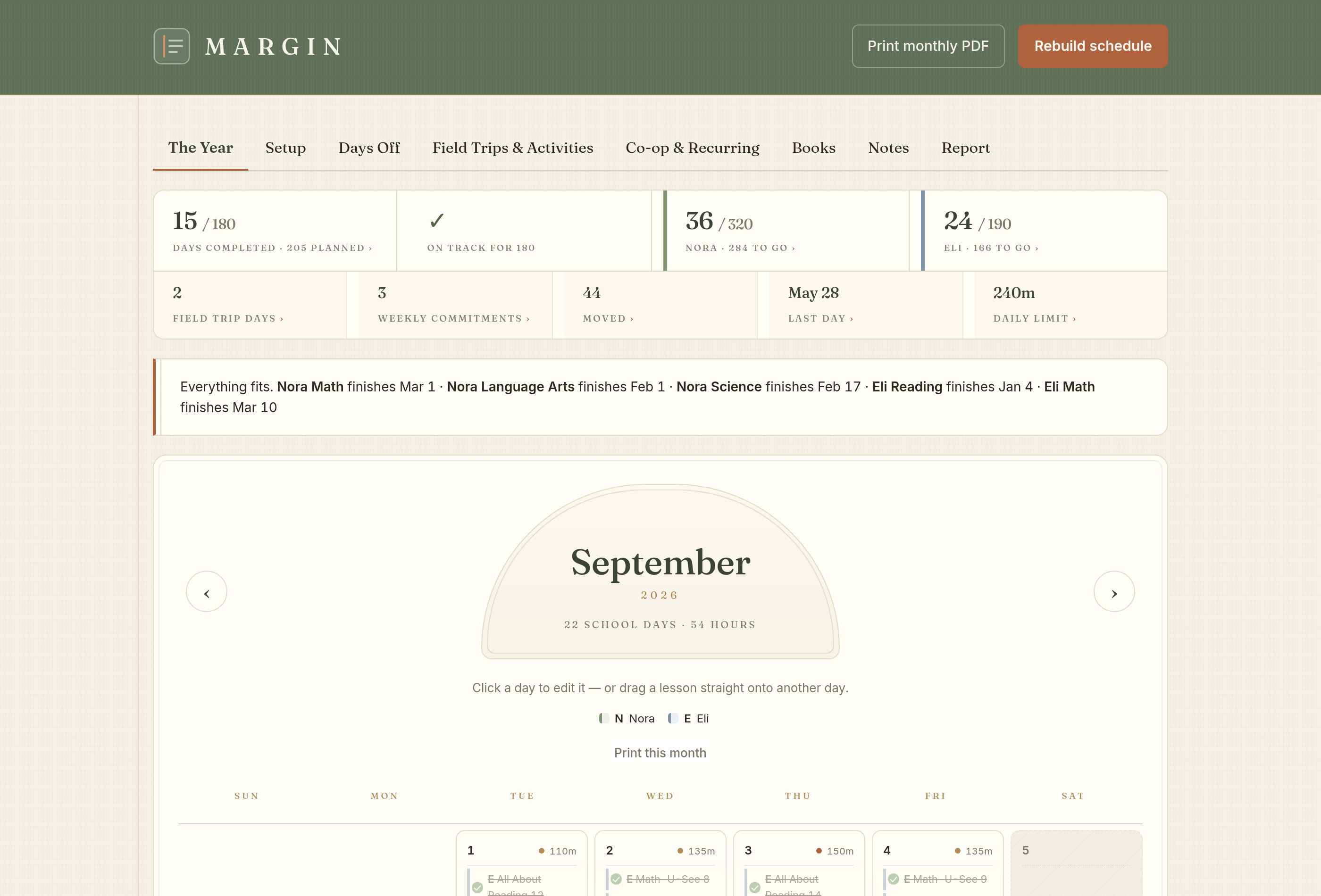
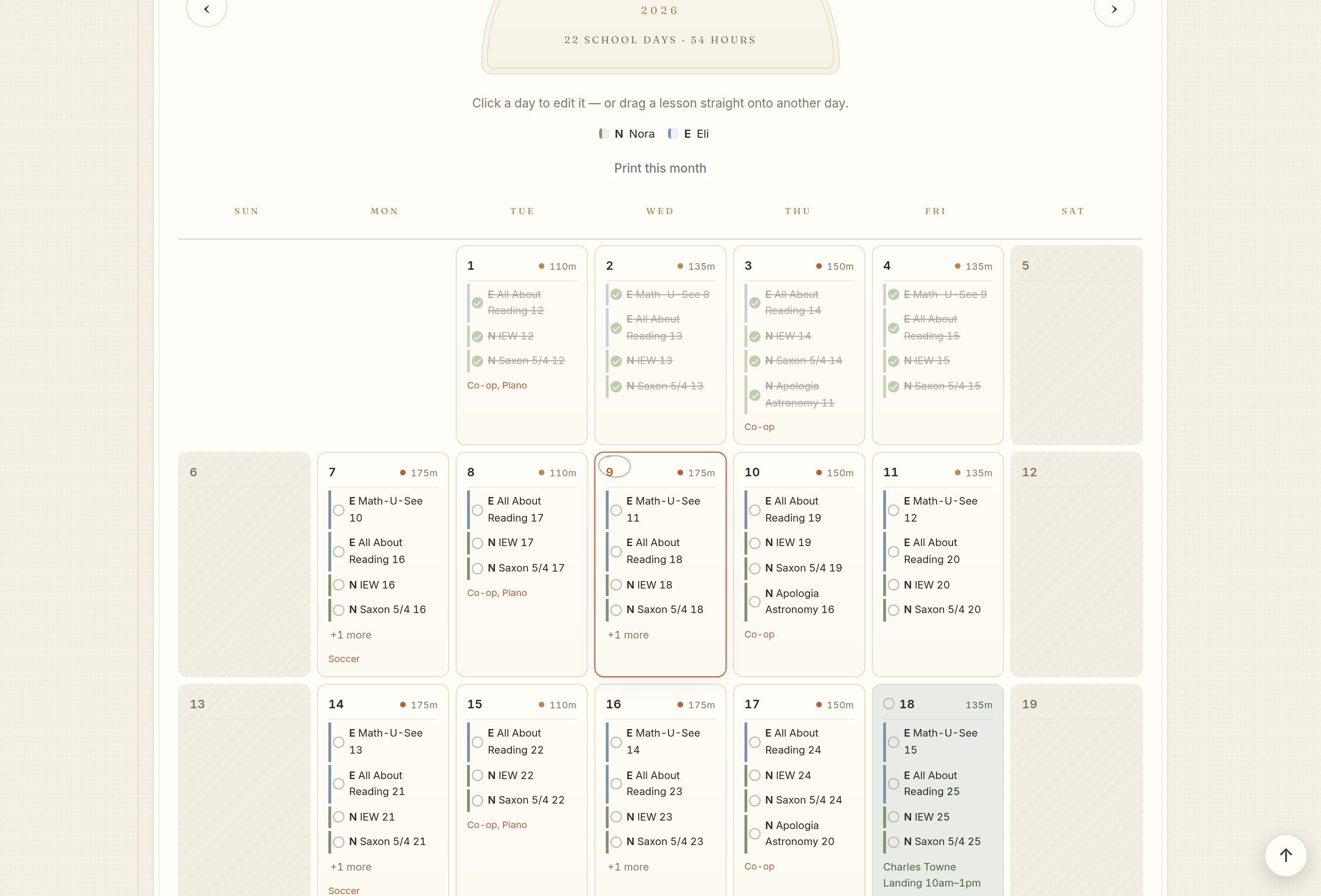
A month of school laid out in Margin, each child in their own color
Every child in their own color
When the week goes wrong

Margin re-plans the rest of the year around what really happened.

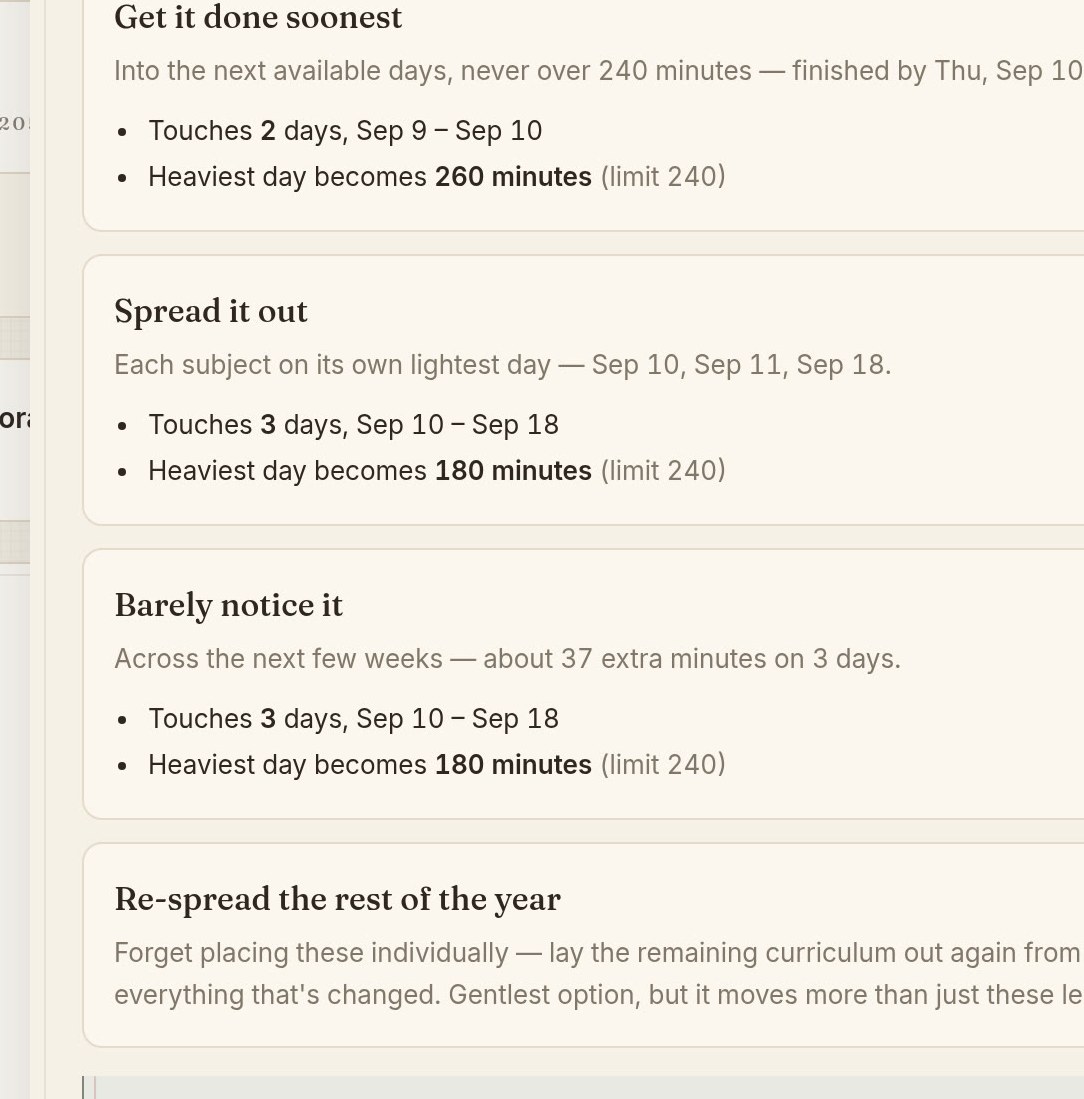
Tell Margin you lost the week. It lays out three ways to catch up and shows how many minutes each one adds to your heaviest day. Nothing changes until you pick one.

  • Three ways to make it up, and you see what each one costs before you choose
  • It picks up from where you really are. Past days keep what you checked off
  • Each subject picks up at the last unbroken lesson, so a chapter you skipped in October doesn’t get lost
  • Finished something early? It moves to today instead of sitting out in the future and throwing off everything around it
  • A lesson you moved by hand stays exactly where you put it
  • Changed your mind? Undo puts a reschedule or a Rebuild back the way it was
Start your free trial
Three ways to absorb a missed week, each priced in minutes
Nothing moves until you say so
The day in front of you

Today in the order you’ll actually do it.

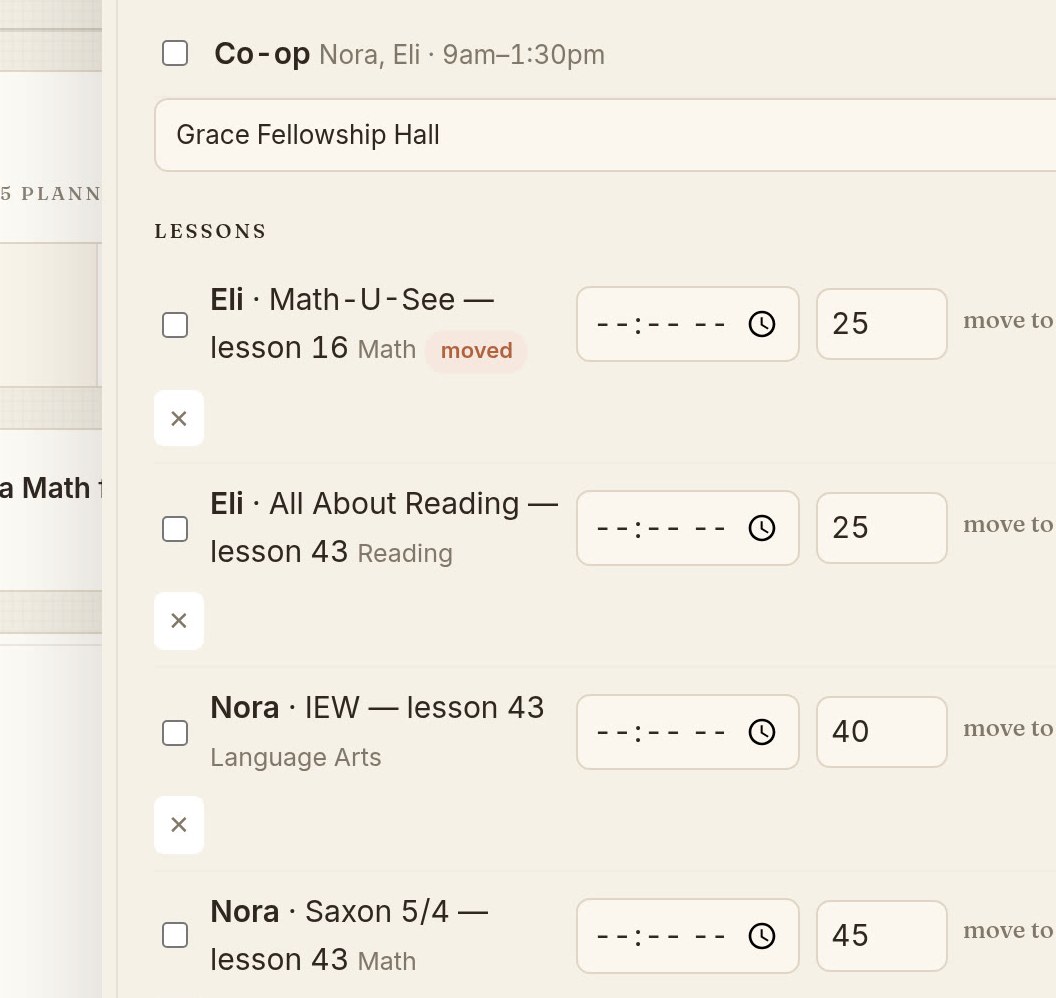
Each child’s lessons show in their own color with the total minutes. Check things off as you go, or mark the whole day done and get on with it.

  • Drag a lesson to another day with a mouse, or with your finger on the iPad
  • Every move can be undone. Margin tells you which lesson moved to which day and offers to put it back
  • On a phone the month turns into an agenda, and finished days fold up into one line so this week stays at the top
  • The Day button shows one day at a time on a phone or a computer
  • Rename any lesson to what it really is, like “Chapter 3 Test.” Check it off and give it a grade
  • You can open any day, even one with nothing planned, because the work you did on a free Saturday should get written down too
Start your free trial
A single day in Margin, each child's lessons in their own color
Drag a lesson onto another day

Four kinds of day counted correctly.

So the number at the top of the page is one you could hand to an association without explaining it.

The days that aren’t bookwork

A day at the aquarium is a school day. Margin counts it as one.

Keeping these straight is why you can trust your total. Most planners lump them all together.

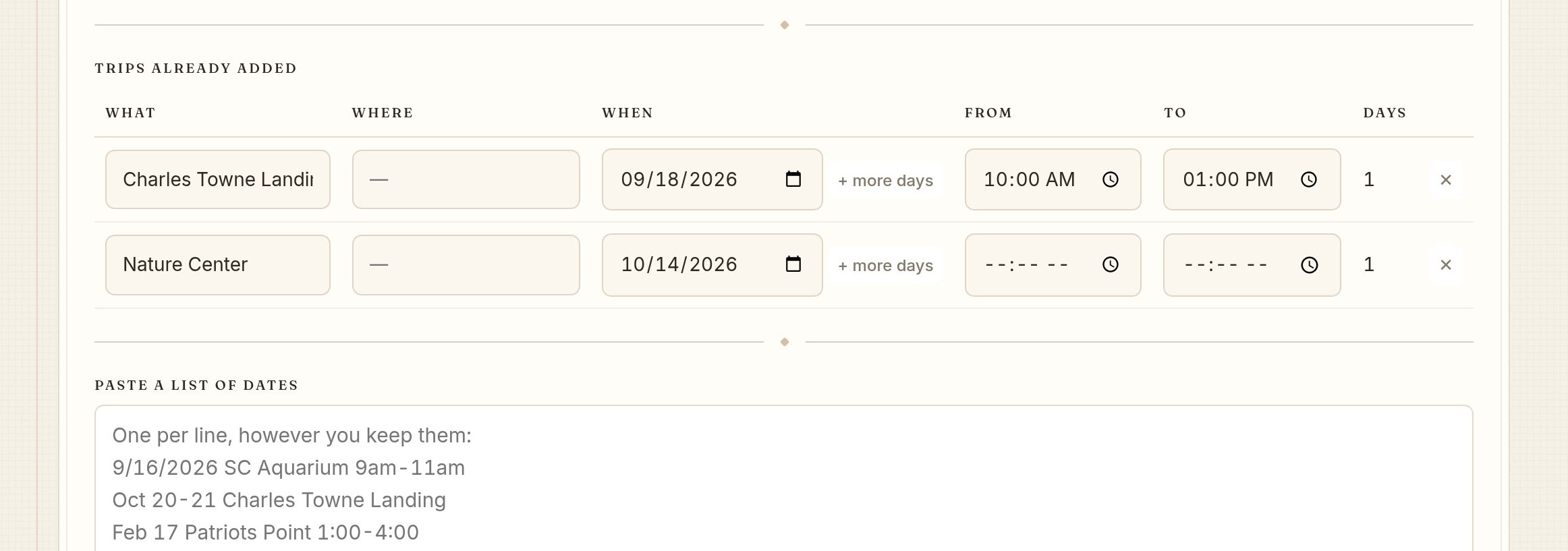
  • Field trips count toward your total, with no bookwork piled on them
  • Out-of-term learning, like nature camp in June, counts without turning June into a school month
  • Days off for the whole family, or for one child while the others keep going. One child home sick is still a school day for the family
  • Sick days you set aside in August count when you use them. Planning for a sick day and then taking it isn’t falling behind
  • Co-op and other regular activities repeat, take their bite out of the day and can have a different name for each child
  • Plans changed? Take a field trip off one day right from that day. The rest of the trip stays and the day gets its lessons back
Start your free trial
Field trips and activity days in Margin
Per child, or the whole family
The record

The paperwork for your portfolio review is already done.

You didn’t do anything extra for this. It’s just the plan you’ve been checking off all year, laid out as a report.

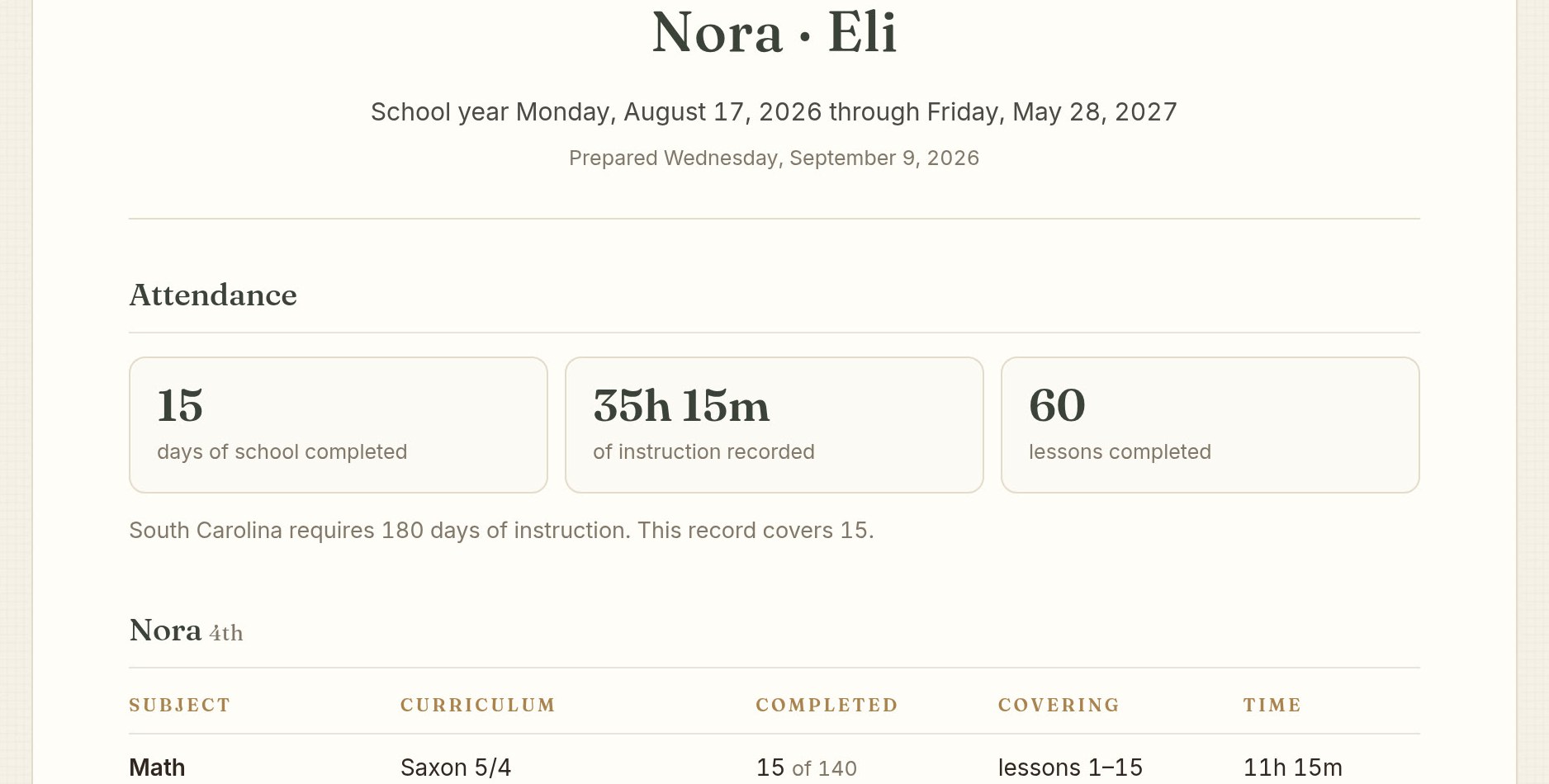
  • Days completed next to the days your state requires, plus hours of instruction
  • Every subject with its curriculum and how far through it you got
  • An average grade and letter for every subject you graded
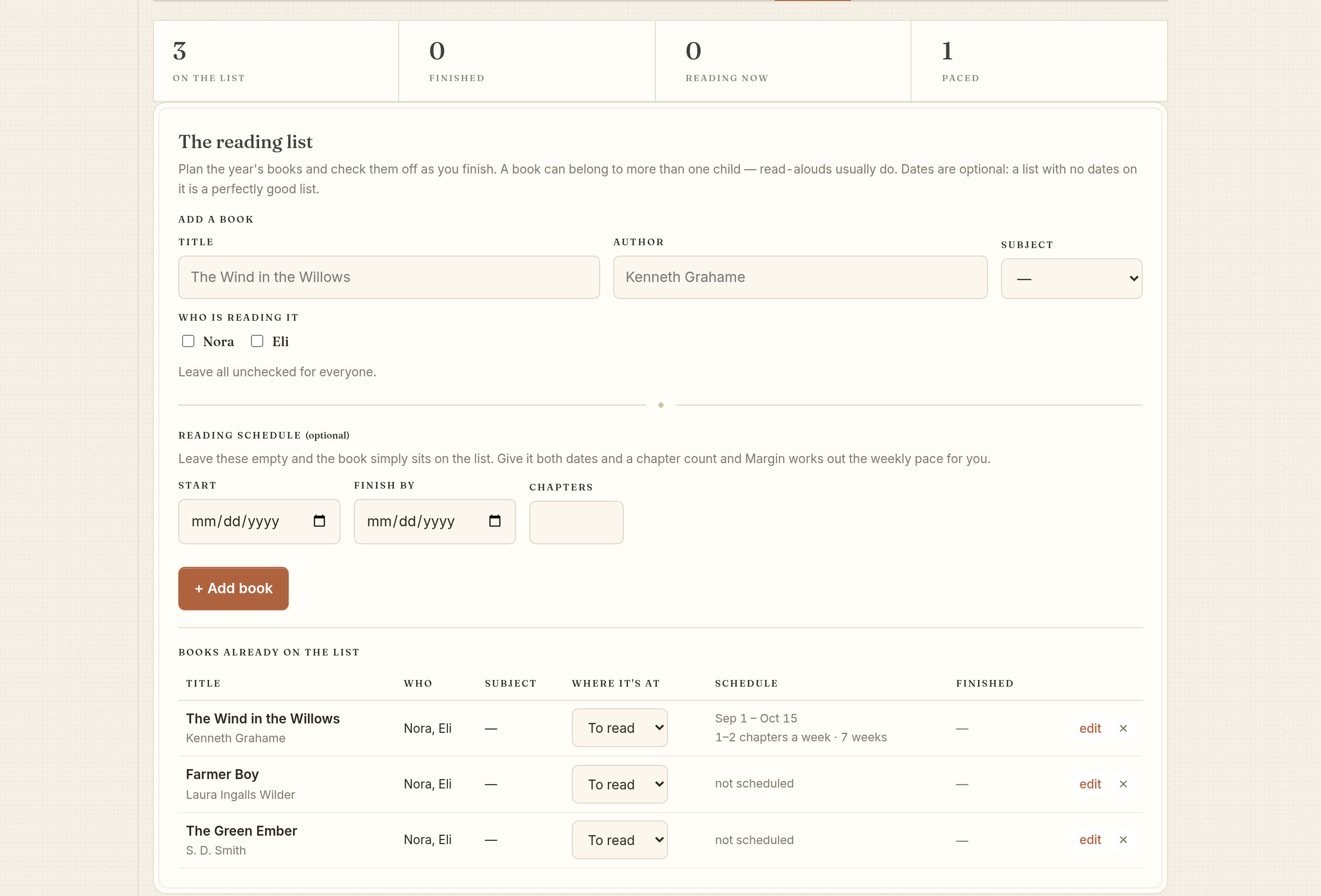
  • The reading list: every book each child finished this year
  • Field trips and activity days with dates and where you went
  • The whole year or any one month, ready to print or save as a PDF
  • Each child’s grade level on the record, picked from a list
  • A printable plan to write on for the whole family or one child. Pick a month, a week or a day, with a box to check on every line
Start your free trial
A printable homeschool record: days, hours, books and field trips
Around the lessons

Book reports, chores and library books have a place too.

A lot of the school week isn’t bookwork. It still has due dates, and it still gets forgotten.

  • Assignments like a book report or a science project. Give it a start and a due date. It shows up every school day until then, and the due day has a box for the grade
  • Assignments don’t use up minutes in the day, so the lessons around them stay put
  • Chores for each child, with pictures for the ones who can’t read yet
  • The reading list. Scan the barcode on a book and the title and author fill in. The camera picture stays on your phone
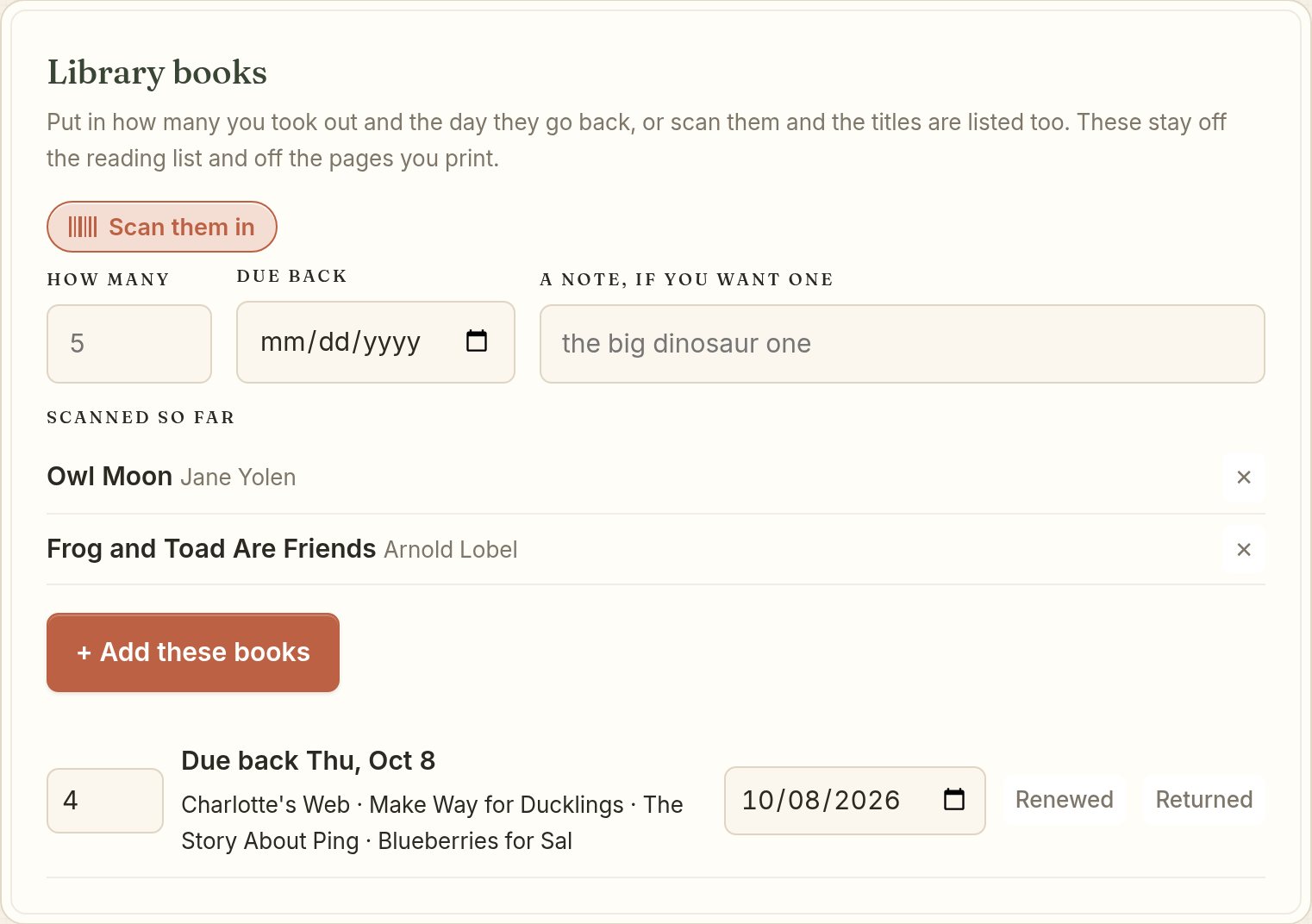
  • Library books. Scan the stack or just type how many. The titles are listed and the due date goes on your calendar. A note shows at the top when they’re due tomorrow or late. Mark them renewed for four more weeks
  • Share a link with a grandparent or a sitter. It shows one child's day, week or the dates you pick. It’s locked with a password you choose and stops working after the last day
Start your free trial
Library books scanned into Margin, listed by title with a due date
Scan the stack
The end of the year

The year is done when you say it’s done.

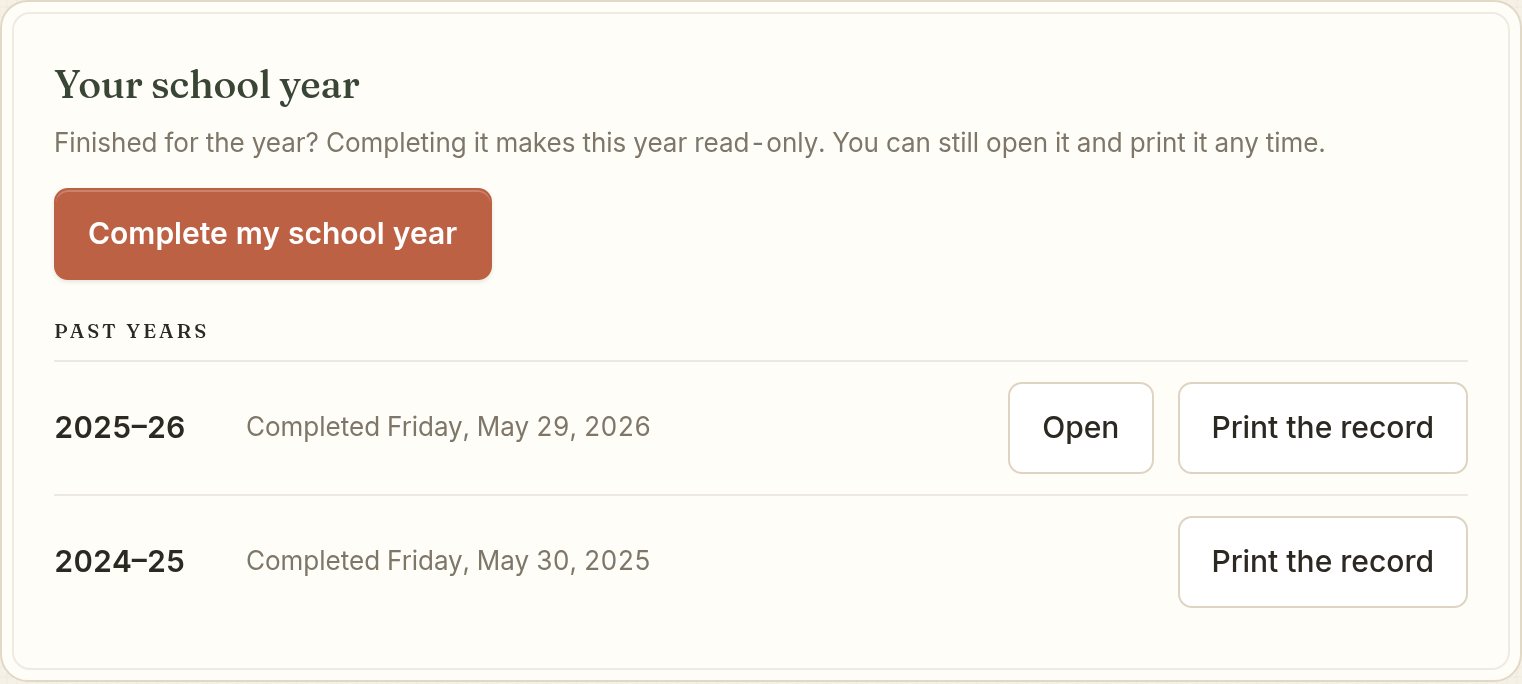
Press Complete my school year on the Report page. Cue the confetti. The year is saved just as it was. Start the next one whenever you’re ready. Most families take a month or two.

  • The year ends when you say so. It doesn’t end on its own when you hit your required days
  • A finished year is read-only. You can still open it, print it and save a copy
  • Start next year is a quicker setup. Your children carry over one grade up, and you can change any of them
  • Days off, co-op and books are set up fresh. Continuing a book? Put in the lesson you’re starting on
  • Past years live on the Report page. Last year opens and older years print. Nothing is thrown away
  • Made a mistake? You can reopen a finished year. Margin asks twice first
  • Last year's field trips and co-op stay on your calendar when the new year starts
Start your free trial
The Report page with Complete my school year and a list of past years
On your own calendar

The out-of-the-house part of school goes on the family calendar.

Subscribe once from Google or Apple and the events you picked show up right next to everything else in your week.

  • Pick what shows up: field trips, co-op, activities, out-of-term days. Bookwork stays off unless you turn it on
  • Want co-op on the shared calendar and the rest on yours? Subscribe twice and pick different things each time
  • Two kids at the same co-op on the same day show up as one event, unless something about it is different for each
  • Nine in the morning stays nine in the morning when the clocks change for daylight saving
  • Works with Skylight. Paste the same address into the Skylight app and your week shows up on the wall calendar
  • Turn it off and the feed is deleted right then. Off means gone now, not fifteen minutes from now
Start your free trial
Choosing what syncs to your calendar
You choose what syncs
Wherever you are

On your laptop, your iPad and the phone in your pocket.

We save your year on your own device first and copy it to your account. So it’s there at the kitchen table and on the couch without you thinking about it.

  • Works offline, because your plan is saved right on your device
  • Open on two devices? The newest save wins. An older copy can never overwrite a newer one
  • Add a second parent with their own login. Choose whether they can only look, change the calendar, or do everything
  • Easy with a finger or a mouse. Bigger buttons, a month that stays a month on an iPad and an agenda on a phone
  • Save your whole year to a file and bring it back in later. You can even restore from the very first setup screen
Start your free trial
Margin on a tablet, the year at a glance
The same year on every device
What we won’t do

Your children's schedule is not a product.

Anyone who can see a co-op schedule can tell where a child will be and when. So we never let an outside service see yours.

  • Nothing about a child is sold, shared, or handed to an AI to learn from
  • The calendar feed only goes out if you turn it on, and it only carries what you checked
  • Its address is made with a one-way hash. It can be read but never written to, and no one can work the secret back out of it
  • A book you add joins the shared list of curricula by its name and lesson count. Nothing about your family goes with it
  • Stop paying and you keep your records. You can still open, print and export every year you made
Read the questions
The reading list each child finished this year
This never leaves your device
A father and child at the kitchen table with a science notebook open
Two children building a stick fort in the woods
A mother and her two children in the kitchen, mid-morning

Every one of these is a school day. Margin counts them that way.

Still in the works.

We’d rather tell you straight. You should know exactly what you’re getting and what’s still on the way.

Checking off from a shared linkA grandparent or a sitter can already read and print a shared week. Next they can check the work off as it gets done.
TranscriptsGrades are already in. Next comes a transcript built from them.

Start your year, and let February look after itself.

$80 a year for the whole family, no matter how many kids. Or $8 a month. Try everything free for 14 days.

Questions · What we believe · Notes · Contact · Privacy · Terms

Margin™ © 2026 Margin Planner LLC