Head to head, September 2026

Homeschool Planet gives you a calendar.
Margin gives you a whole year.

One of them asks you to fill in every square. The other asks for your books and puts every lesson on a date for you.

What’s the difference between Margin and Homeschool Planet?

Homeschool Planet is built around a calendar you fill in. Margin is built around one question: what are we doing today? You hand Margin your books and your lesson counts, and it lays out your whole school year for you.

Everything else follows from that. A planner that laid your year out can put it back together when a stomach bug takes a whole week in October. A calendar you typed in by hand can only be typed in again.

We make Margin, so we’re not neutral here, and you should read the page knowing that. The least we can do is get the facts right. Every fact about Homeschool Planet on this page came off their own published pages, and their prices were read on 25 September 2026.

The first evening

Which one is faster to set up?

Margin is faster. You give it two things per book: the name and how many lessons are in it. That’s all the setup there is. Margin does the rest and hands you back a finished year.

Think about the last planner you tried. How many evenings went by before it was any use to you? Did you ever get to the end of setting it up at all, or is it still sitting there from August, half filled in? That is not something you failed at. Setting one up should never have taken that long.

This is not a small thing.

Cathy Duffy reviewed Homeschool Planet warmly and still wrote that setting up the assignment weighting “might take more time than entering the actual assignments.” A reviewer who likes a product does not write that sentence unless the setup earned it.

So we did the weighting for you. Tests, Homework and Quizzes already have weights on them the first time you turn grades on, and you can change every one of them. A planner you give up on in October is worth nothing to anybody, which is why simple beats clever here.

See everything it does

A mother and her two children work together at the kitchen counter mid-morning

How do Margin and Homeschool Planet compare, line by line?

They cost within five dollars a year of each other, and both of them run on a phone, a tablet and a laptop. The real difference is who does the planning.

The table is wide. Slide it sideways to see every column.

  Margin Homeschool Planet
A year $80 About $84.95
A month $8 About $9.95
More children One price covers however many children you have. It is included. One subscription covers the household.
Free trial The trial runs 14 days. A card starts it, and canceling inside the two weeks means you are not charged. Theirs runs 30 days and takes no card. It is the longer trial.
Laying out the year Margin does it. You put in books and lesson counts, and every lesson comes out on a real date through your last day. Their pages describe a calendar of lessons and assignments that you build and reuse.
The week you lose Margin offers three catch-up routes and a full rebuild of the rest of the year, and it shows how much longer each one would make your busiest day before you choose. Nothing moves until you pick one. Their help pages cover rescheduling assignments.
Grades Margin builds a grade per subject from every graded lesson and assignment. The weighted categories arrive already weighted. You edit the A–F scale. You can split fall and spring semesters on your own dates. You can type the letter yourself. You can print a report card. All of it stays off until you ask. They give you weighted categories you build per course, three editable grading scales, and grading by percent, letter or fraction.
High school transcript A transcript is launching this fall. They have one. It holds courses, credits, GPA and honors, saved as a PDF.
Kinds of day Margin counts four kinds separately: a school day, a day off, a field trip and a co-op day. One child can take a day off while the others keep going, and sick days you set aside in August count when you spend them. They have attendance tracking and attendance reports.
A photo of the co-op calendar Snap it and Margin types it in. It does the same with a book list. The photo is read on your own device and never leaves it. We did not find this on their pages.
A cap on the day Say four hours a child and Margin will not plan past four hours. Co-op, piano and the drive come out of the day first. We did not find this on their pages.
Your book’s own numbering Margin uses 2.4, or Unit 3 Lesson 1, or whatever your book prints. You can start a book at lesson 41 if that’s where you are. We did not find this on their pages.
No signal The year is on the device. A campground works. A dead router works. Their own help pages are the place to check this.
Apps Margin runs in any browser on any of them today, and the iPhone, iPad and Android apps are built and waiting on the stores. The app is the same application as the website, so everything on marginplanner.com is in it. There is no lite version. They have iPhone, iPad and Android apps in the stores now. Their own help page says a phone shows your schedule “a day at a time” and a tablet shows “a full week”. Their iOS listing is rated 4.2 out of 5 from 11 ratings.
What the App Store privacy card declares Margin declares no advertising identifier. It has no third-party trackers or pixels. No part of your family’s planner is sent to an outside service. They declare four kinds of data as “Data Linked to You”: contact info, user content, identifiers and diagnostics. That is their own declaration on their own listing.
AI, ads and trackers Margin will never do any of it. We settled that before the first line of code. Read their privacy policy. We can only speak for ours.

Homeschool Planet’s prices, trial, gradebook and transcript were read off their own subscription and knowledge-base pages on 25 September 2026. Where a row says we did not find something, that means we did not find it published, and not that it cannot be done. Please go and read their pages too.

What a planner is for

Why does Margin feel easier to use?

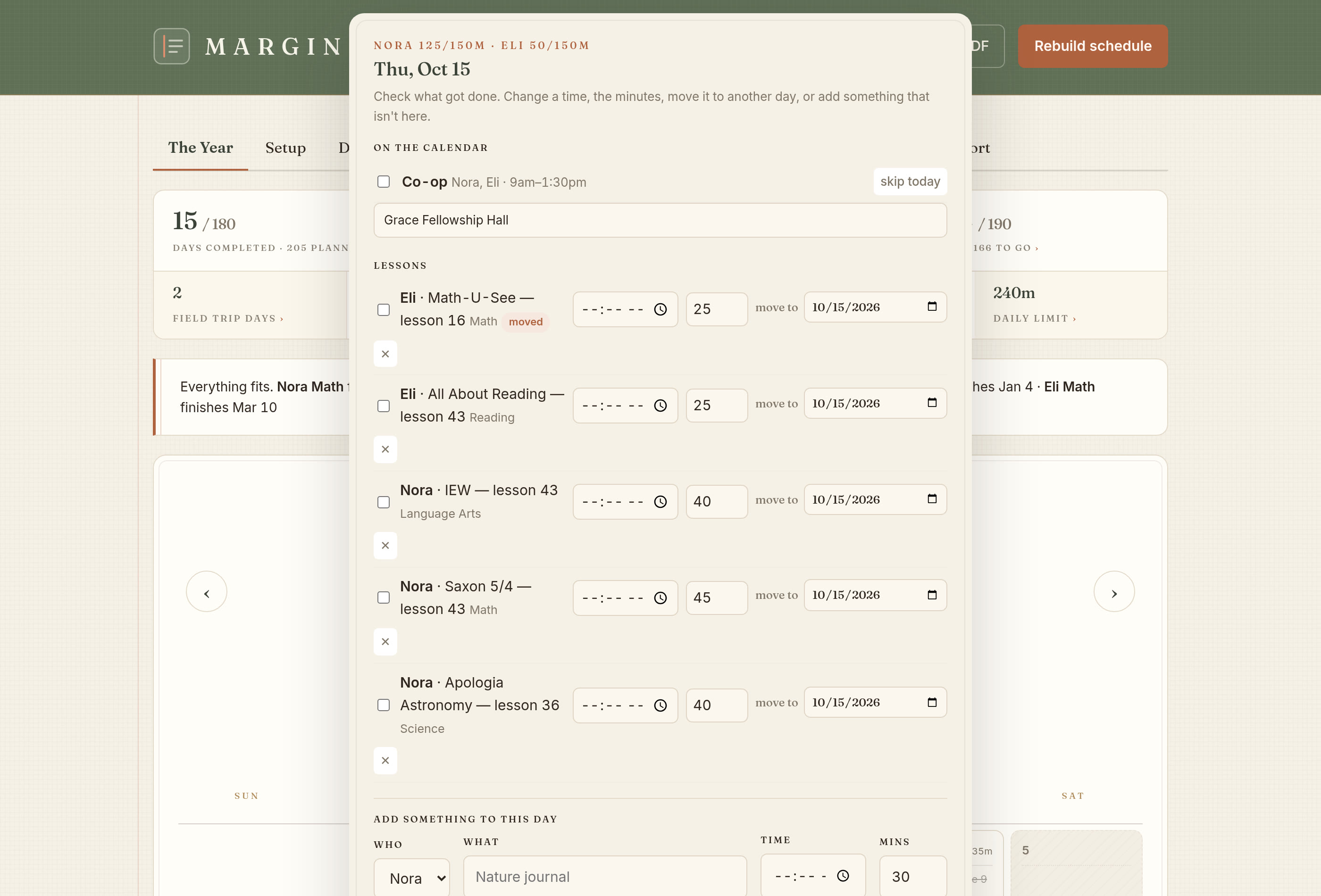
It only ever answers one question. Open Margin and you see today: each child, each subject, each lesson, in order, with how long it should take. Nothing else is on the screen.

A calendar is a wonderful thing for a dentist appointment and a strange thing for a math book. A math book is 140 lessons in a fixed order, and what you need to know on a Tuesday is which one is next. A month grid can tell you that only after you have typed all 140 squares yourself.

More settings do not mean more help.

Every extra setting is one more thing you have to get right before the planner does anything for you. It is one more thing to get wrong at eleven at night in August. We would rather make a good guess and let you fix it later. That is why the categories arrive weighted, the day already has a length, and the year is laid out before you have touched anything.

Every other planner has to be rewritten. Margin rewrites itself.

Today's lessons for each child sit on a tablet in order, with the time each one takes
Both of us shipped one

Both have an app. The two apps do different things.

Both of us have an app, so a feature list checks the same box twice and calls it even. What each app actually shows you is different, and so is how much of your planner you can open inside it.

What their app shows

  • Their app shows part of the planner, not all of it. Their own help page describes the app as showing your schedule “a day at a time” on a phone, and “a full week” on a tablet. That is their description, not ours: on a phone it is a narrower window onto the planner than the website is
  • Your day comes to you as a list. What you get is the day’s items written out one under another
  • How it is rated. Their iOS listing shows 4.2 out of 5 from 11 ratings

What Margin’s app shows

  • You see today in the order you will do it. It lists each child, each subject and each lesson, with how long it should take
  • Each child gets their own color, so you can see whose lesson is whose without reading a word
  • Drag a lesson to another day with your finger, and the rest of the year keeps up
  • You get the whole planner, not a version of it. Margin’s app is the same application as the website, wrapped natively. Everything you can do on marginplanner.com you can do in the app. There is no lite Margin

One part is worth reading before you install either one.

Apple makes every app publish the same standardized privacy card, in the same words, so that two apps can be held side by side. It is the developer’s own declaration, and it is the one place a family can compare two planners without taking either company’s word for it.

Homeschool Planet’s card declares four kinds of data as “Data Linked to You”: Contact Info, User Content, Identifiers and Diagnostics. Linked to you is Apple’s phrase, and it means the data is tied to your identity rather than pooled anonymously. User content, in a homeschool planner, is the planner: the subjects, the lessons, the assignments, the notes about how a child is doing. Identifiers are the values that let activity be recognized as yours across sessions and, where an advertising identifier is involved, across other companies’ apps.

None of that is wrongdoing, and we are not saying it is. It is ordinary, it is disclosed, and they disclosed it themselves. But it is worth knowing what it means in practice: a record of your family’s school year, attached to your name, held somewhere you do not control, for purposes you did not set.

Margin’s answer to the same card is a short one. Margin declares no advertising identifier. It has no third-party trackers, pixels or advertising software. No part of your family’s planner is sent to any outside service. Your subjects, your lessons and your notes about your children stay between you and Margin. When you photograph a co-op calendar, your own phone does the reading and the photo never leaves it. That was decided before the first line of code, which is why it is the same answer in the app as on the website — there is only one Margin.

Homeschool Planet’s schedule views come from their own help pages, and the ratings and the privacy declaration from their own App Store listing, all read on 26 September 2026. A developer can update a privacy card at any time, so read theirs on the listing yourself before you decide.

A promise, not a setting

What happens to your children’s information in Margin?

It stays here. There are no ads, no advertising profile and no third-party trackers or pixels. Nothing your children do in Margin is handed to an AI or sent out to anybody else.

Your children’s schedule is not a product. It is never sold, never shared, and never handed to an AI to learn from.

A homeschool planner holds where your children are at ten in the morning, which subject makes somebody cry, which Tuesdays you drive to co-op, and the name of your church. We decided what happens to that before we wrote any code. When you photograph a co-op calendar, your own phone does the reading. Nothing is uploaded and nothing is copied.

What we believe

Which one should you pick?

Pick Margin, unless you need to print a college transcript before this fall. Homeschool Planet prints one today and Margin's is launching this fall.

Margin is for you if

  • You want the year laid out for you instead of typing it in
  • Your weeks move, and retyping the plan is what killed the last one
  • You want to be set up tonight, not this weekend
  • You need days attended and progress by subject, printable, twice a year
  • You want one price for every child you have
  • You want your children nowhere near an AI, an ad or a tracker
  • You teach with a phone in your hand, sometimes with no signal
Start your free trial

What you have by bedtime

  • Every lesson in every book on a real date, through your last day
  • A day for each child that fits inside the hours you gave it
  • Any lesson that won’t fit flagged in August and counted
  • Days attended, field trips and co-op days counted separately
  • Grades ready to turn on and already weighted, or left switched off
  • Records you can print for an association on the day they ask
Questions first

What does Margin cost?

$8
a month for your whole family, however many children you have. You can pay $80 a year instead, which gives you two months free.
You get 14 days free, and a card starts the trial. Cancel inside the two weeks and you are not charged. And if you ever stop paying, you keep your records. You can still open, print and export every year you planned in Margin.
Start your free trial

Spend one evening and get a whole year.

Type in your books tonight and Margin will hand you back your whole school year before you go to bed.

Questions · What we believe · Notes · Contact · Privacy · Terms

Online homeschool planner · Digital homeschool planner · Homeschool planning app

Margin™ © 2026 Margin Planner LLC